Thank you for downloading Fotosizer
Your download should start automatically in 3 seconds...
If this fails to start, please click on this link to start the download. Download now
Problems downloading?
Some browsers (such as Google Chrome or Microsoft Edge) may display a message similar to:
"fsSetup324.exe isn't commonly downloaded. Make sure you trust fsSetup324.exe before you open it."
This warning appears automatically for newly downloaded or less frequently downloaded .exe files. It does not mean the file is unsafe.
Fotosizer is safe to install when downloaded directly from our official website.
How to complete the download
- Click the Download now link above to download Fotosizer.
- When the warning is shown:
- Hover your mouse over the download and click the three dots (...).
- Select Keep.
- You may see a further confirmation with a Cancel and Delete button, click the arrow next to the Delete button and select Keep anyway.
- Your download should now be accepted.
- Click the Open file link for the download to open the Fotosizer installer.
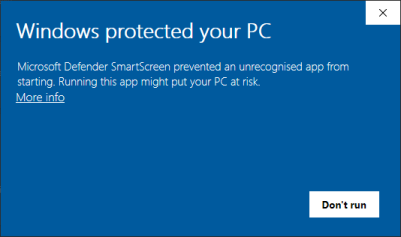
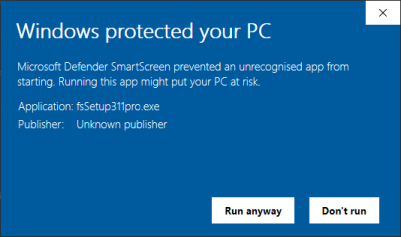
Alternatively, if you see a "Windows protected your PC" notification, follow the steps below to proceed:
- Click the More info link on the SmartScreen warning dialog.
- You should then see a further confirmation dialog, click the Run anyway button, which will allow the download.